 Bematist
Music that keeps pace with your run
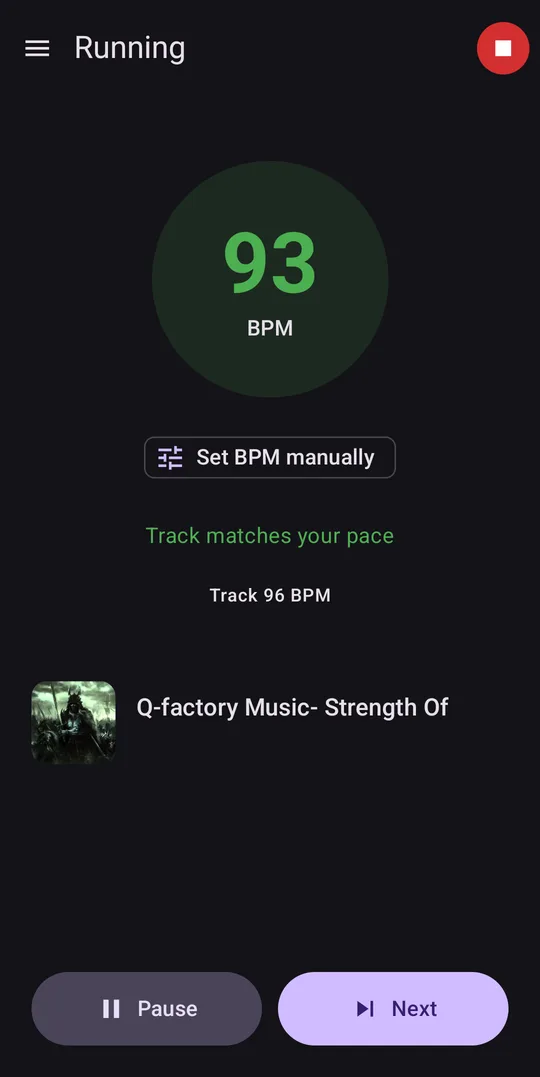
Bematist counts your steps per minute and plays tracks from your own music library with a matching tempo. When your pace changes, the music follows.
For Android 13 or newer. Free and open source.
How it works
-
Choose your music
Pick the folders that hold your music. Bematist reads each track’s tempo from its tags, or measures it on your phone.
-
Tap GO and run
Your phone’s motion sensors measure your cadence, the number of steps you take each minute.
-
The music follows
Bematist plays tracks whose tempo fits your pace, and switches automatically when your pace changes.
-
Your own music
It plays files already on your phone. There is no streaming and no subscription.
-
Works offline
There is no account and no server. The app doesn’t even have permission to use the internet.
-
Collects nothing
No ads, no analytics and no tracking. The privacy policy has the details.
Questions and answers
How do I install it?
The easiest way is F-Droid, an app store for free and open-source Android apps. Install F-Droid, search for Bematist, and it will keep the app up to date.
You can also download the APK, the Android installation file, from the GitLab releases page. An APK installed this way won’t update by itself.
Which phones does it run on?
Android phones running Android 13 or newer. There is no iPhone version.
Does it speed up or slow down my music?
No. Tracks always play at their normal speed. Bematist changes which track plays, not how fast it plays.
Where does the music come from?
From audio files already on your phone, in common formats such as MP3, FLAC, Ogg, Opus, M4A and WAV. You choose which folders Bematist can read. It doesn’t work with streaming services.
What are cadence and tempo?
Cadence is how many steps you take per minute. Tempo is how fast a track is, in beats per minute, or BPM. Bematist looks for tracks whose tempo is close to your cadence.
Half and double tempo count too, so a 172 BPM track suits a pace of 86 steps per minute, and the other way round.
Where should I carry my phone?
Somewhere it moves with your stride, because the step count comes from its motion sensors. On a treadmill, or with the phone in a bag, the count can’t be trusted, so you can set the tempo range by hand during your run.
How long does the first scan take?
It depends on the size of your library and on how many tracks already have a BPM value in their tags, because those don’t need analysing. A large library can take a long time, so keep the phone plugged in. The scan keeps going with the screen off.
It only has to happen once, because later scans skip anything unchanged.
Does it need an account or an internet connection?
No to both. Bematist doesn’t request permission to use the internet, so it can’t send anything anywhere.
Does it track my route?
No. Bematist doesn’t request location permission. It records your cadence and the tracks it played, and Bematist never sends that record anywhere.
Is it really free?
Yes. It costs nothing and has no ads. It is open-source software under the GPLv3 licence, and you can read the source code.
What is a “bematist”?
Bematist (Ancient Greek: βηματιστής), plural bematists or bematistae (Ancient Greek: βηματισταί), meaning ‘step measurer’ (from βῆμα bema, meaning ‘step, pace’), were specialists in ancient Greece and ancient Egypt who measured distances by pacing.
Bematists accompanied Alexander the Great on his campaign in Asia.
From Bematist on Wikipedia, available under CC BY-SA 4.0.
This app counts steps too, though it uses them to choose your next track rather than to map Asia.